








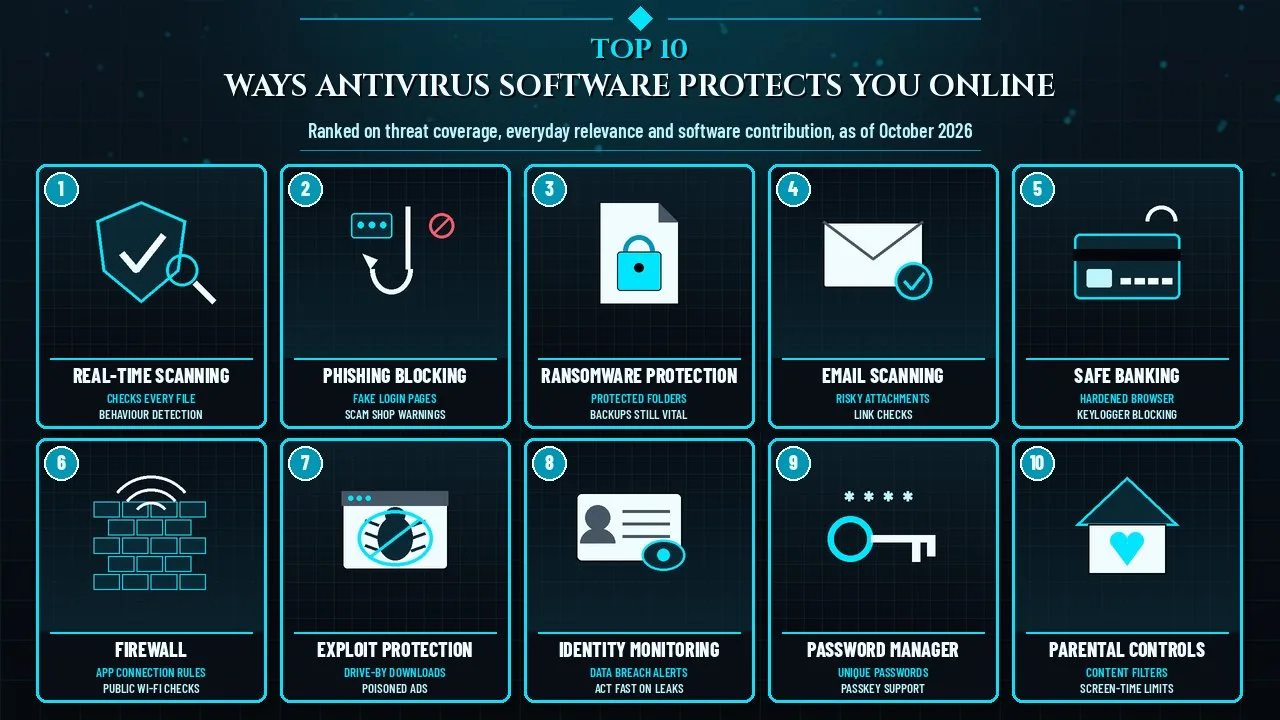
These ways antivirus software protects you online cover malware, ransomware, phishing, fake websites, risky Wi-Fi and stolen passwords on every device.
Antivirus software began as a simple tool that compared files against a list of known viruses. Modern security suites still do that, but they now sit between you and the web, your inbox, your bank login and even your children's browsing. Some of those layers do heavy lifting on their own; others only work well when paired with sensible habits such as updating software and using unique passwords.
This Finepedia guide, written as of October 2026, ranks ten protections found in mainstream antivirus and security suites for Windows, macOS, Android and iOS. It explains what each feature actually does, where its limits are, and what you still need to do yourself. It is not a product review, and no brand is endorsed; free built-in tools such as Microsoft Defender, Google Play Protect and Apple's XProtect deliver several of these protections without any extra purchase.
How We Ranked the Ways Antivirus Software Protects You
Each protection was scored from 1 to 5 on three equally weighted criteria, giving a total out of 15. Scores are Finepedia's editorial judgement, applied with the same definitions to every feature and informed by public guidance from national cybersecurity agencies, the FBI Internet Crime Complaint Center, independent test labs such as AV-TEST and AV-Comparatives, and well-documented history of major attacks.
- Threat coverage (1 to 5): how serious and how widespread the harm is that the feature addresses, from data loss and financial theft down to unwanted content.
- Everyday relevance (1 to 5): how often an ordinary home user, student or small-business owner is likely to meet that threat in normal use.
- Software contribution (1 to 5): how much of the protection the antivirus layer itself provides, as opposed to protection that depends mostly on the user's choices or on other tools.
When totals tie, the higher Threat coverage score ranks first, then Everyday relevance. Useful features that did not make the top ten are listed under Honourable Mentions.
The Scorecard
| Rank | Protection | Threat coverage | Everyday relevance | Software contribution | Total |
|---|---|---|---|---|---|
| 1 | Real-Time Malware Scanning | 5 | 5 | 5 | 15 |
| 2 | Phishing and Fake Website Blocking | 5 | 5 | 4 | 14 |
| 3 | Ransomware Protection | 5 | 4 | 4 | 13 |
| 4 | Email and Attachment Scanning | 4 | 5 | 4 | 13 |
| 5 | Safe Banking and Payment Protection | 4 | 4 | 4 | 12 |
| 6 | Firewall and Network Attack Protection | 4 | 4 | 3 | 11 |
| 7 | Exploit and Malvertising Protection | 4 | 3 | 4 | 11 |
| 8 | Identity Theft and Data Breach Monitoring | 4 | 3 | 3 | 10 |
| 9 | Password Manager and Brute-Force Defence | 3 | 4 | 3 | 10 |
| 10 | Parental Controls | 3 | 3 | 3 | 9 |
Parental controls rank last not because children's safety matters less, but because filters only handle part of the problem; conversation, device rules and age-appropriate platform settings matter at least as much as software.
Ways Antivirus Software Protects You at a Glance
| Rank | Protection | Main threat it targets | What you still need to do |
|---|---|---|---|
| 1 | Real-Time Malware Scanning | Viruses, trojans, spyware, worms | Keep the software and its definitions updated |
| 2 | Phishing and Fake Website Blocking | Fake login pages and scam shops | Check addresses before typing passwords |
| 3 | Ransomware Protection | File-encrypting extortion malware | Keep offline or versioned backups |
| 4 | Email and Attachment Scanning | Malicious attachments and links | Treat unexpected attachments with suspicion |
| 5 | Safe Banking and Payment Protection | Banking trojans and session theft | Turn on bank alerts and two-step login |
| 6 | Firewall and Network Attack Protection | Intrusions and risky public Wi-Fi | Avoid sensitive tasks on open networks |
| 7 | Exploit and Malvertising Protection | Drive-by downloads and poisoned ads | Patch the operating system and browser |
| 8 | Identity Theft and Data Breach Monitoring | Leaked personal data and fraud | Change exposed passwords; freeze credit where possible |
| 9 | Password Manager and Brute-Force Defence | Guessed and reused passwords | Use unique passphrases and passkeys |
| 10 | Parental Controls | Harmful content and over-use | Talk with children about online risks |
1. Real-Time Malware Scanning
| Attribute | Details |
|---|---|
| What it does | Checks files and running programs the moment they are opened, downloaded or executed |
| Threats covered | Viruses, worms, trojans, spyware, adware, keyloggers and potentially unwanted programs |
| Detection methods | Signatures, heuristics, behaviour monitoring, cloud reputation and machine-learning models |
| Built-in examples | Microsoft Defender Antivirus on Windows, XProtect on macOS, Google Play Protect on Android |
| Main limit | Brand-new threats can slip past until detection data is updated |
Real-time scanning, sometimes called on-access protection, is the core job of any antivirus program and the reason it earns the top score. Instead of waiting for a weekly scan, the software inspects each file as it lands on the device or tries to run, and blocks or quarantines anything that looks harmful.
Origins and History
The idea of self-copying code is older than the personal computer. An experimental program called Creeper moved between machines on ARPANET in the early 1970s, and a companion program called Reaper was written to find and remove it, an early ancestor of antivirus software. Fred Cohen's academic work in the mid-1980s popularised the term "computer virus", and the Brain virus of 1986, written in Lahore, is widely cited as the first virus for IBM PC compatibles.
Early scanners relied almost entirely on signatures, short fingerprints of known malicious code. As malware authors began changing their code automatically, vendors added heuristics that judged suspicious structure, then behaviour monitoring that watched what a program did after it started. Today most products also query cloud reputation services that know how common and how trustworthy a file is across millions of devices.
Key Features
- On-access scanning of downloads, USB drives and newly created files
- Behaviour monitoring that stops a program if it starts acting like malware, even without a known signature
- Quarantine, which isolates a suspicious file so it can be restored if it turns out to be harmless
- Scheduled and on-demand full scans for files that arrived before protection was installed
- Automatic definition and engine updates, usually several times a day
Significance
Nearly every other layer on this list depends on this one. Phishing pages often try to push a download, ransomware has to run on the device, and banking trojans must install themselves first. If real-time scanning catches the payload, the rest of the attack fails. Independent labs such as AV-TEST in Germany and AV-Comparatives in Austria test this protection regularly against fresh samples, and their public results are a better guide to quality than marketing claims.
Interesting Facts
- The EICAR test file is a harmless 68-byte text string that antivirus products agree to detect, so users can confirm protection is switched on without handling real malware.
- Microsoft Defender started life as an anti-spyware tool for Windows XP and Windows Vista and became a full antivirus built into Windows 8 in 2012.
- Apple's macOS has included the XProtect signature-based scanner since Mac OS X Snow Leopard in 2009.
- The Morris worm of November 1988 spread across thousands of internet-connected computers and is often credited with pushing computer security into public debate.
2. Phishing and Fake Website Blocking
| Attribute | Details |
|---|---|
| What it does | Warns about or blocks web pages that impersonate trusted brands or host malicious content |
| Threats covered | Fake login pages, scam online shops, tech-support scams and malicious download sites |
| How it works | URL reputation lists, page-content analysis and browser extensions |
| Built-in examples | Microsoft Defender SmartScreen and Google Safe Browsing in major browsers |
| Main limit | Very new phishing pages may not yet be on any block list |
Phishing is the attempt to trick you into handing over a password, card number or one-time code by pretending to be someone you trust. Web protection inside a security suite checks each address you visit against constantly updated lists of known bad sites, and many products also inspect the page itself for signs of brand impersonation.
Origins and History
The word phishing appeared in the mid-1990s, when attackers posed as staff of the online service AOL to steal account details. As online banking and shopping grew in the 2000s, the same tactic moved to fake bank pages and payment notices. Browser makers responded with built-in reputation services, and antivirus vendors added their own web filters and browser extensions on top.
The Anti-Phishing Working Group, an industry and law-enforcement coalition founded in 2003, publishes regular reports tracking phishing activity worldwide. In its annual reports, the FBI Internet Crime Complaint Center has repeatedly listed phishing and spoofing as the most commonly reported type of complaint.
Key Features
- Real-time checks of every web address against cloud reputation databases
- Warnings on look-alike domains that swap letters or add extra words to a real brand name
- Blocking of pages that serve malware downloads or fake "your computer is infected" pop-ups
- Link checking in search results and on social media sites in some products
- Protection that follows you across browsers when it works at the network level rather than as a single extension
Significance
Phishing goes after the person rather than the software, which is why it remains effective even against fully patched devices. A strong web filter will not stop every new scam, but it removes a large share of known ones before you see them. It scores one point lower than real-time scanning on software contribution because the final decision, typing a password into a page, still rests with the user.
Interesting Facts
- Attackers increasingly use free website certificates, so a padlock icon only proves the connection is encrypted, not that the site is honest.
- Many phishing pages stay online for only hours, which is why cloud-based reputation updates matter more than weekly signature downloads.
- Look-alike domains sometimes use characters from other alphabets that appear identical to Latin letters, a trick known as a homograph attack.
3. Ransomware Protection
| Attribute | Details |
|---|---|
| What it does | Detects and stops programs that try to encrypt or lock your files and demand payment |
| Threats covered | Crypto-ransomware, screen lockers and data-theft extortion |
| How it works | Behaviour monitoring, protected folders, decoy files and in some products automatic file rollback |
| Built-in example | Controlled folder access in Microsoft Defender on Windows 10 and Windows 11 |
| Main limit | Cannot recover files on its own if no backup exists and the attack is not caught early |
Ransomware encrypts documents, photos and databases, then demands payment for the key. Specialised protection watches for the tell-tale pattern of a program rapidly opening and rewriting large numbers of files, stops it, and in some suites restores the affected files from a protected cache.
Origins and History
The first widely documented ransomware, the AIDS Trojan of 1989, was handed out on floppy disks to attendees of a World Health Organization AIDS conference and demanded payment by post. Ransomware became a mass threat in the 2010s once strong encryption and anonymous online payments made extortion easier; CryptoLocker in 2013 is a commonly cited turning point.
In May 2017 the WannaCry outbreak spread worldwide by exploiting a Windows file-sharing flaw that Microsoft had patched two months earlier, disrupting organisations including parts of the National Health Service in England. In 2016 Europol, the Dutch National Police and security companies launched the No More Ransom project, which offers free decryption tools for some ransomware families.
Key Features
- Protected folders that only approved apps may change
- Behaviour detection that halts mass file encryption within seconds
- Decoy files that act as tripwires when malware touches them
- Rollback or shadow-copy restoration in some security suites
- Alerts when an unknown program tries to change protected documents
Significance
Ransomware combines high damage with a direct financial motive, which is why it earns a top threat score. Home users can lose irreplaceable family photos; small businesses can lose days of trading. Security agencies, including the US Cybersecurity and Infrastructure Security Agency, generally advise against paying ransoms and stress backups as the most reliable recovery route. Antivirus is the first line of defence; an offline or versioned backup is the second.
Interesting Facts
- Many modern ransomware gangs steal data before encrypting it, then threaten to publish it, a tactic known as double extortion.
- WannaCry's spread was slowed when a security researcher registered an unregistered domain name hard-coded into the malware, which acted as a kill switch.
- Controlled folder access arrived with the Windows 10 Fall Creators Update in 2017 but is switched off by default and must be enabled by the user.
- No More Ransom publishes its decryptors free of charge and in many languages.
4. Email and Attachment Scanning
| Attribute | Details |
|---|---|
| What it does | Scans incoming messages, attachments and embedded links before you open them |
| Threats covered | Malicious documents, infected archives, fake invoices and links to phishing pages |
| How it works | Attachment scanning, link rewriting or checking, spam and spoofing filters |
| Where it runs | In desktop mail apps through the antivirus, and on the server side in most webmail services |
| Main limit | Encrypted or password-protected archives can hide content from scanners |
Email remains one of the most common ways malware and scams arrive, because a message can be tailored to look like a parcel notice, an invoice, a job offer or a note from a colleague. Email protection scans attachments as they arrive and checks links inside the message, so a harmful file is flagged before anyone double-clicks it.
Origins and History
The ILOVEYOU worm of May 2000 showed how fast an email attachment could spread: it arrived as a "love letter" script, mailed itself to everyone in the victim's address book and damaged files across millions of computers. Through the 2000s and 2010s, attackers moved to fake invoices and documents carrying macros, small scripts that could download malware once enabled.
In 2022 Microsoft began blocking macros by default in Office files downloaded from the internet, a change security researchers widely saw as a blow to one of the most common attack routes. Attackers shifted to other file types, such as disk-image and shortcut files, which is why scanning engines keep adding new formats.
Key Features
- Scanning of attachments including documents, archives and scripts
- Detection of links that lead to known phishing or malware sites
- Warnings when a sender's address does not match the display name or the claimed company
- Spam filtering that removes bulk scam messages before they reach the inbox
- Integration with desktop mail clients and, in business products, with cloud mail services
Significance
Email scores the maximum for everyday relevance because nearly everyone uses it daily and attackers can reach millions of inboxes at almost no cost. Server-side filtering at large webmail providers already removes much of the noise, but an antivirus on the device adds a second check when a file is saved and opened, which matters for attachments that slip through.
Interesting Facts
- Business email compromise, where criminals impersonate a boss or supplier to redirect payments, often contains no malware at all and relies purely on persuasion.
- Attackers sometimes zip a file with a password and put the password in the email body, specifically to stop automated scanners from reading the contents.
- The ILOVEYOU attachment had a double extension, appearing as a text file while actually being a Visual Basic script.
5. Safe Banking and Payment Protection
| Attribute | Details |
|---|---|
| What it does | Protects online banking and shopping sessions from interception and tampering |
| Threats covered | Banking trojans, keyloggers, screen capture, fake payment pages and session hijacking |
| How it works | Hardened browser windows, keyboard protection and verification of bank site certificates |
| Typical extras | Virtual keyboards, clipboard protection and warnings about fake shops |
| Main limit | Cannot stop a user from authorising a payment to a scammer voluntarily |
Many paid security suites include a protected browser mode that opens when you visit a bank or payment page. It isolates the session from other programs, blocks screenshots and key-capture tools, and checks that the site's security certificate genuinely belongs to the bank.
Origins and History
Banking trojans grew alongside online banking. Zeus, first identified in 2007, became one of the best-known families; it recorded keystrokes and could inject fake fields into genuine bank pages to collect extra details. Its source code later leaked, inspiring many copycat families. Banks responded with one-time codes and transaction alerts, while security vendors built isolated browsers to block the injection techniques these trojans used.
On smartphones, banking malware often disguises itself as a harmless utility app and then requests accessibility permissions that let it read the screen. Mobile security apps and Google Play Protect scan installed apps for this behaviour.
Key Features
- An isolated or hardened browser session for banking and payment sites
- Protection against keyloggers and screen-capture tools during the session
- Certificate checks that warn of fake or intercepted bank connections
- Detection of fraudulent online shops and fake payment pages
- Mobile app scanning for overlay and accessibility-abuse malware
Significance
Money is the most common motive behind online attacks, so protection at the moment of payment directly reduces real-world losses. The FBI Internet Crime Complaint Center reported total losses of more than 16 billion US dollars in its 2024 annual report, much of it from investment and payment fraud. Software can block the technical tricks, but many of those losses came from social engineering, where the victim was persuaded to send money; no antivirus can fully prevent that.
Interesting Facts
- Transaction alerts by SMS or app notification are among the simplest ways to spot fraud quickly, and most banks offer them free of charge.
- Some banking malware waits silently until the user visits a specific bank's website before activating.
- In India, cyber fraud can be reported through the national helpline 1930 and the National Cyber Crime Reporting Portal run by the Ministry of Home Affairs.
6. Firewall and Network Attack Protection
| Attribute | Details |
|---|---|
| What it does | Controls which programs and devices can communicate with your computer over a network |
| Threats covered | Network worms, port scanning, unauthorised remote access and some interception attacks |
| How it works | Rules that allow or block traffic per app and per network type |
| Built-in examples | Windows Defender Firewall, the macOS application firewall |
| Main limit | Cannot make an untrusted public Wi-Fi network fully safe on its own |
A firewall sits between your device and the network, deciding which connections to allow. Security suites add smarter rules, such as treating a café hotspot as untrusted, and some also warn when a Wi-Fi network shows signs of tampering or when a device on the same network tries to probe yours.
Origins and History
Network firewalls first appeared in corporate networks in the late 1980s and early 1990s. Personal firewalls for home computers followed as broadband made always-on connections common. Microsoft switched on the Windows Firewall by default with Windows XP Service Pack 2 in 2004, after fast-spreading network worms such as Blaster in 2003 infected large numbers of unprotected PCs.
Attacks in which someone secretly relays or reads the traffic between two parties, often called man-in-the-middle attacks, became a common concern with the spread of public Wi-Fi. The wider adoption of encrypted HTTPS websites over the 2010s, helped by free certificates, has made such interception much harder on most mainstream sites.
Key Features
- Per-app rules for incoming and outgoing connections
- Different profiles for home, work and public networks
- Alerts on unusual connection attempts and network scanning
- Wi-Fi security checks for weak encryption or suspicious configurations
- Optional bundled VPN in some suites for use on untrusted networks
Significance
Most home routers already provide a basic barrier, so the device firewall matters most on laptops and phones that move between networks. Its software contribution is scored at 3 because protection on public Wi-Fi depends heavily on encrypted connections, a trusted VPN and user choices. It remains essential, though: an unprotected device on a shared network can be attacked directly without the user clicking anything.
Interesting Facts
- The Blaster worm of 2003 needed no email or download; it spread purely across networks by exploiting a Windows service.
- WPA3, the current Wi-Fi security standard, was introduced by the Wi-Fi Alliance in 2018.
- A firewall that blocks outgoing connections can also stop malware already on a device from contacting its operators.
7. Exploit and Malvertising Protection
| Attribute | Details |
|---|---|
| What it does | Blocks attacks that abuse software bugs, including those delivered through malicious adverts |
| Threats covered | Drive-by downloads, exploit kits, poisoned ads and browser or plugin vulnerabilities |
| How it works | Memory-protection techniques, script analysis, ad and tracker filtering and vulnerability scanning |
| Related tool | Software updaters that flag outdated apps and missing patches |
| Main limit | Unpatched software remains a risk if the user ignores updates |
An exploit is code that takes advantage of a flaw in software, such as a browser, a document reader or the operating system, to run commands without permission. Malvertising is the use of online adverts to deliver such attacks or redirect people to scam pages, sometimes through legitimate ad networks on well-known websites.
Origins and History
In the early 2010s, criminal toolkits known as exploit kits automated these attacks: a visitor who landed on an infected page or ad was silently tested for outdated browser plugins and infected if one was found. The retirement of Adobe Flash Player at the end of 2020 and the move to auto-updating browsers removed many of those weak points.
Attackers adapted by buying search adverts that imitate popular software download pages, or by hiding scripts inside ad content. Security suites responded with web filters that recognise malicious ad redirections, and with vulnerability scanners that tell users which programs on their machine are out of date.
Key Features
- Exploit mitigation that blocks common techniques used to hijack running programs
- Detection of malicious scripts and redirections in web pages and adverts
- Optional ad and tracker blocking in some browsers and suites
- Vulnerability scanners that list missing operating system and app updates
- Warnings about fake download pages that imitate well-known software
Significance
Exploits are dangerous because they can work without any obvious mistake by the user. Everyday relevance is scored at 3 because automatic browser and operating system updates now close most holes quickly, so these attacks mostly hit devices that are behind on patches. That makes this protection especially valuable on older computers; Windows 10, for example, reached the end of standard support on 14 October 2025.
Interesting Facts
- A zero-day is a flaw that attackers exploit before the software maker has released a fix.
- Many malvertising campaigns target people searching for free software, so downloading directly from the developer's official site is a strong habit.
- Some security suites can update third-party apps automatically, not just the operating system.
8. Identity Theft and Data Breach Monitoring
| Attribute | Details |
|---|---|
| What it does | Alerts you when your personal details appear in data breaches or on criminal marketplaces |
| Threats covered | Account takeover, identity fraud and misuse of leaked personal information |
| How it works | Monitoring of breach databases and dark-web sources for your email, phone number or ID details |
| Typical extras | Credit monitoring and identity restoration support in some countries |
| Main limit | It warns after data has leaked; it cannot undo a breach at a company you used |
Spyware and phishing can steal personal details directly from your device, and real-time scanning helps stop that. But much personal data leaks from large company breaches far beyond your control. Identity protection features watch for your details in those leaks, so you can change passwords and alert your bank quickly.
Origins and History
Large-scale data breaches became a regular headline in the 2010s, exposing billions of account records across social networks, retailers and service providers. In 2013 security researcher Troy Hunt launched Have I Been Pwned, a free service that lets anyone check whether their email address appears in known breaches; many password managers and browsers now run similar checks.
Security suites added breach and dark-web monitoring, and in some markets bundled credit monitoring and help lines for victims. Laws also changed: in the United States, placing a credit freeze with the major credit bureaus has been free since 2018, and India's Digital Personal Data Protection Act was passed in 2023.
Key Features
- Alerts when an email address, phone number or ID detail appears in a new breach
- Guidance on which passwords to change and which accounts to secure first
- Credit monitoring and fraud alerts in markets where they are available
- Anti-spyware scanning that blocks local theft of saved logins and documents
- Some suites offer help with identity recovery after fraud
Significance
Identity fraud can take months to unwind, so early warning has real value. The feature scores 3 on everyday relevance because most people will receive only occasional alerts, and 3 on software contribution because the protective action, changing a password or freezing credit, is still up to the user.
Interesting Facts
- Breached email addresses are a key ingredient in credential stuffing, where criminals try leaked username and password pairs on many other websites.
- Many national tax and identity agencies publish their own guidance on what to do after an identity theft, often free of charge.
- A single reused password can link a minor breach at a forum to a major account such as email or banking.
9. Password Manager and Brute-Force Defence
| Attribute | Details |
|---|---|
| What it does | Generates, stores and fills strong unique passwords so stolen or guessed ones cannot unlock other accounts |
| Threats covered | Brute-force guessing, dictionary attacks, credential stuffing and password reuse |
| How it works | An encrypted vault unlocked by one master password, biometrics or a passkey |
| Related protections | Two-step verification, passkeys and login alerts |
| Main limit | The master password and recovery options must themselves be strong and protected |
In a brute-force attack, software tries huge numbers of passwords until one works; dictionary attacks use lists of common words and leaked passwords to speed this up. Many security suites now bundle a password manager, which makes long, random and unique passwords practical, so guessing becomes unrealistic and one leak cannot open everything.
Origins and History
Password guessing is as old as shared computers, but the problem grew with the number of accounts each person holds. Standalone password managers spread in the 2000s and 2010s, and browsers and security suites later added their own. Guidance also changed: the US National Institute of Standards and Technology, in its digital identity guidelines (SP 800-63B), recommends allowing long passphrases, screening new passwords against lists of known-compromised ones, and not forcing routine changes unless there is evidence of compromise.
In May 2022 Apple, Google and Microsoft announced expanded support for passkeys, a login method based on FIDO Alliance standards that replaces the password with a cryptographic key stored on the device and resists phishing by design.
Key Features
- Random password generation for every new account
- Encrypted storage synchronised across devices
- Automatic filling only on the genuine website, which also helps expose fake login pages
- Alerts for weak, reused or breached passwords
- Support for passkeys and two-step verification codes in some products
Significance
Reused passwords turn a single breach into many. A password manager tackles that directly, and its auto-fill behaviour gives a quiet anti-phishing bonus, because it will not offer a saved password on a look-alike domain. It ranks ninth because websites and services also enforce lockouts and rate limits against brute-force attempts, and because the strongest step, enabling two-step verification or passkeys, sits with the user and the service.
Interesting Facts
- Simple sequences such as "123456" and "password" regularly appear near the top of published lists of the most common leaked passwords.
- Adding length usually strengthens a password more than adding a single symbol, which is why passphrases of several random words are widely recommended.
- Passkeys cannot be typed into a fake website, because each key is tied to the genuine site's domain.
10. Parental Controls
| Attribute | Details |
|---|---|
| What it does | Helps families filter content, manage screen time and see which apps children use |
| Threats covered | Adult or violent content, gambling sites, unsafe downloads and excessive screen time |
| How it works | Category-based web filtering, app limits, schedules and activity reports |
| Built-in alternatives | Microsoft Family Safety, Google Family Link and Apple Screen Time |
| Main limit | Determined older children can often find workarounds, and filters can block useful sites |
The internet offers children excellent learning, games and creativity, but also content that is unsuitable for their age. Parental controls in security suites let parents block categories of websites, set daily time limits, approve new apps and receive simple reports, usually across Windows, Android and iOS devices from one dashboard.
Origins and History
Web filters for families appeared in the 1990s as home internet use took off, and in the United States the Children's Online Privacy Protection Act of 1998 set rules for how websites collect data from children under 13. In the 2010s, as smartphones reached younger users, operating system makers built their own family tools, and antivirus vendors extended their controls to mobile devices.
More recently, laws such as the UK's Age Appropriate Design Code and its Online Safety Act 2023 have placed more responsibility on platforms themselves, so parental software now works alongside safety settings inside apps and services.
Key Features
- Website filtering by category, with allow and block lists
- Screen-time schedules and daily limits per device
- App approval and age-rating controls
- Location sharing on mobile devices in some suites
- Activity reports that help start conversations rather than replace them
Significance
Parental controls give families a practical starting point, especially for younger children. Every score sits at 3 because the risks they address are real but narrower than malware or fraud, and because child-safety experts consistently stress open conversation, sensible device rules and platform privacy settings alongside any filter. Used together, those measures are far more effective than software alone.
Interesting Facts
- Most major platforms set default privacy protections for accounts registered to younger users, but these depend on the correct age being entered.
- Content filters also reduce the chance of children clicking malicious pop-ups or fake download buttons.
- Many experts suggest agreeing family device rules together, so children understand why limits exist.
Antivirus Protection Compared with Good Habits
| Threat | What antivirus software adds | Habit that closes the gap |
|---|---|---|
| New malware | Behaviour and cloud detection | Install apps only from official stores and developers |
| Phishing | Block lists and page analysis | Type important addresses yourself or use bookmarks |
| Ransomware | Protected folders and rollback | Keep an offline or versioned backup |
| Exploits | Mitigation and patch reminders | Turn on automatic updates |
| Stolen passwords | Breach alerts and password manager | Use passkeys or two-step verification |
| Payment scams | Safe browser and shop warnings | Verify payment requests through a second channel |
The pattern is consistent: security software is strongest against technical attacks and weakest against persuasion. The best results come from combining both columns.
Honourable Mentions
- Built-in VPN: encrypts traffic on untrusted networks, though it shifts trust to the VPN provider rather than removing risk.
- Webcam and microphone protection: alerts when an unfamiliar app tries to use the camera or microphone.
- Anti-theft tools for phones and laptops: remote lock, locate and wipe, also available free from Apple, Google and Microsoft.
- Cloud backup: some suites include storage that helps recover from ransomware or a lost device.
- Scam call and SMS filtering on mobile: flags known fraud numbers and messages with suspicious links.
Frequently Asked Questions
Do I still need antivirus software in 2026?
Yes, in most cases, but you may not need to buy it. Windows, macOS and Android all include built-in protection that independent labs rate well. Paid suites add extras such as banking protection, identity monitoring, parental controls and VPNs. Whatever you use, keep it switched on and updated, and pair it with automatic system updates and backups.
Is Microsoft Defender good enough for home users?
For many home users, Microsoft Defender, kept up to date and combined with sensible habits, provides solid malware and web protection at no extra cost. Independent test labs regularly publish its results alongside paid products. People who want password management, identity monitoring or multi-device parental controls in one dashboard may still prefer a full security suite.
Can antivirus software stop phishing completely?
No. Web protection blocks many known phishing pages and suspicious links, but brand-new pages and convincing messages can get through before they are reported. The safest habit is to open important websites yourself rather than through links, check addresses carefully, and use passkeys or two-step verification so a stolen password alone is not enough.
Does antivirus protect against ransomware?
Good antivirus software can detect and stop many ransomware attacks, and some products can roll back files that were changed. However, no tool catches everything. An offline or versioned backup is the most reliable recovery plan, and security agencies generally advise against paying ransoms, because payment does not guarantee recovery and funds further crime.
Do phones need antivirus apps?
Android includes Google Play Protect, and iPhones restrict apps to curated stores with strong sandboxing, so both start with useful built-in protection. Extra security apps mainly add phishing link checks, scam-message filtering and anti-theft tools. On any phone, the biggest risks are installing apps from unofficial sources and approving unnecessary permissions.
Can I run two antivirus programs at once?
Running two full real-time antivirus engines together is usually a bad idea, because they can conflict, slow the device and even block each other. On Windows, Microsoft Defender automatically steps back when another registered antivirus is installed. A second opinion is better obtained with a one-off on-demand scanner rather than a second always-on product.
Will antivirus software slow down my computer?
Modern products are designed to have a modest effect on everyday performance, and independent labs such as AV-TEST and AV-Comparatives measure performance impact as part of their tests. Full scans can use more resources, so most products schedule them for idle time. If a device feels much slower, check for overlapping security tools or outdated software.
Conclusion
The ways antivirus software protects you online reach far beyond scanning for viruses. Real-time scanning stops harmful files, web and email protection catch phishing before you click, ransomware shields guard your documents, and banking, firewall and exploit protection cover the moments when attacks are most costly. Identity monitoring, password managers and parental controls extend that protection to accounts and families.
No single tool makes anyone invulnerable. The strongest setup in 2026 pairs up-to-date security software with automatic updates, backups, unique passwords or passkeys, and a healthy suspicion of urgent messages. For more on the technology shaping daily life, explore Finepedia's guides to the most popular social media apps and sites, the inventions that changed the world and the essential lessons every business owner should know.
- Reference overview (Sept 2019): https://10mosttoday.com/antivirus-programs-online-threats/
- FBI Internet Crime Complaint Center, 2024 Internet Crime Report: https://www.ic3.gov
- US Cybersecurity and Infrastructure Security Agency (CISA), ransomware guidance: https://www.cisa.gov/stopransomware
- No More Ransom project (Europol and partners): https://www.nomoreransom.org
- NIST Special Publication 800-63B, Digital Identity Guidelines: https://pages.nist.gov/800-63-4/
- Anti-Phishing Working Group, Phishing Activity Trends Reports: https://apwg.org
- AV-TEST Institute and AV-Comparatives independent test results: https://www.av-test.org and https://www.av-comparatives.org
- Microsoft Learn, Microsoft Defender Antivirus and controlled folder access documentation
- Indian Cyber Crime Coordination Centre, National Cyber Crime Reporting Portal: https://cybercrime.gov.in
- Finepedia internal: https://finepedia.com/post/most-popular-social-media-apps-and-sites-top-10
- Finepedia internal: https://finepedia.com/post/inventions-that-changed-the-world-top-10
- Finepedia internal: https://finepedia.com/post/things-to-know-as-a-business-owner-10-essential-lessons
















Log in with